Model workflow
A complete set up of CORE-WESM includes three different elements,
the raw input data,
an OSeMOSYS model file, and
Python-based workflow scripts along with configuration files in YAML language.
The input data and the OSeMOSYS model file are provided in the model repository, along with the workflow scripts and default versions of the configuration files.
Running the model entails four different steps:
Setting up the configuration files defining workflow and model run
Processing the raw input data to generate a model input data set
Performing CORE-WESM runs
Analysing model results
These steps are further explained in the sections below.
An overview of the workflow and data flows is provided in Figure below.
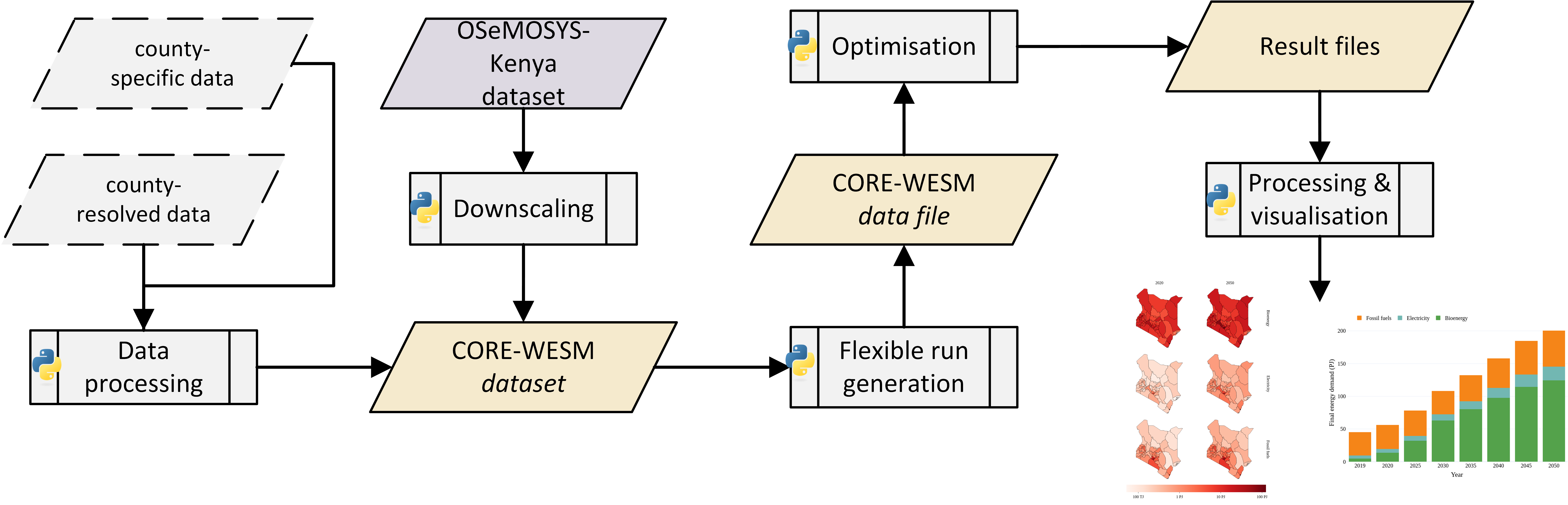
Diagramme showing the run workflow of CORE-WESM. The figure is adopted from this preprint.
Configuration of workflow and run
The configuration of the workflow and model is based on five configuration files in YAML format, which includes data (config_CORE-WESM.yaml and config_OSeMOSYS_Kenya.yaml) and workflow (run.yaml, analysis_config_X.yaml and pipeline_config.yaml) configuration files.
The data configuration files list the sets and parameters and relevant specifications, e.g., data types, for the national OSeMOSYS Kenya model as well as CORE-WESM. The format is similar to config files used for the OSeMOSYS processing library otoole. Data configuration files are provided in the model repository and only need to be updated if the model structure is amended. An excerpt of config_CORE-WESM.yaml is shown below.
AvailabilityFactor:
    indices: [REGION,TECHNOLOGY,YEAR]
    type: param
    dtype: float
    default: 1
CapacityFactor:
    indices: [REGION,TECHNOLOGY,TIMESLICE,YEAR]
    type: param
    dtype: float
    default: 1
The workflow configuration files need to be updated to match the local model setup, and to define the required model runs. The model repository includes default workflow config files. The files are also shown in full below.
pipeline_config.yaml defines the general model setup, in particular also filepaths:
# Configuration for workflow of CORE-WESM
filepaths:
    national_data_file : '../data/raw/national_datafiles/data_smp_mod_adj.txt'
    national_spreadsheet_file : '../data/processed/national_spreadsheets/data_smp_adjt.xlsx'
    downscaled_model_path : '../data/processed/county_model/v014t/'
    county_processed_path : '../data/processed/county_model_processed/v016t/'
    results_path: "../results/"
    data_config_file_NM : './config_files/config_OSeMOSYS_Kenya.yaml' # file path to the OSeMOSYS data config file for the OSeMOSYS Kenya model
    data_config_file_CW : './config_files/config_CORE-WESM.yaml' # file path to the OSeMOSYS data config file for the county-resolved model
    ft_param : "./config_files/multiscale_params.xlsx"
    glpk_dir : '../envs/bin/'
    tech_to_sector_mapping_file : './config_files/tech_to_sector.xlsx'
    comm_to_sector_mapping_file : './config_files/dem_com_to_sector.xlsx'
    list_counties_file : "./config_files/list_counties.csv"
    pop_file : '../data/raw/KNBS/population/counties_population_KNBS.csv'
    pop_file_ruur : '../data/raw/KNBS/population/distribution-of-urban-rural-population.csv'
    gdp_file : "../data/raw/KNBS/GCP/GCP_2020.csv"
    housing_char : "../data/raw/KNBS/housing_survey/Chapter-5-Housing-Characteristics-Amenities-and-Adequacy.xlsx"
    housing_dem : "../data/raw/KNBS/housing_survey/Chapter-3-Household-Demographic-and-Economic-Characteristics.xlsx"
    nat_scens : "../data/raw/nat_scens/"
    el_access : "../data/raw/others/electricity_access.csv"
    market_seg: "../data/raw/others/market_segmentation.csv"
downscaling:
    downscaled_sectors : ["Residential","Residential-Urban","Residential-Rural","Services","Agriculture"] # sectors that are downscaled to the county level
    remove_fte_tech_mode : True # if to remove FTE techs

county_processing:
    datasets : ["cooking"] # which county-level datasets and other enhancements to incorporate
run.yaml sets the analyes, i.e., model runs, to be performed:
# Analysis to perform
name: "KNeCS" # config file for the analysis needs to be defined
id: "v00X"
run_model: True
analysis_config_KNeCS.yaml defines an analysis setup, e.g., scenarios and spatial configuration to be used for model runs:
name: KNeCS

scenarios: # Scenarios need to have unique names
    - name: "BAU"
      model: "WESM"
      levers: ["S1"] # list of scenario lever that will be used
      timehorizon: [2015,2051] # note the end year is not included
    - name: "SimNetZero"
      model: "WESM"
      levers: ["S4"]
      timehorizon: [2015,2051]
    - name: "KNeCS"
      model: "WESM"
      levers: ["S3"]
      timehorizon: [2015,2051]
    - name: "SP"
      model: "WESM"
      levers: ["S2"]
      timehorizon: [2015,2051]
    - name: "OptNetZero"
      model: "WESM"
      levers: ["S5"]
      timehorizon: [2015,2051]

runs:
    model_file: "./osemosys_preprocessing_adapted_f.txt"
    agg_years: "config_files/ysa.csv"
    agg_ts: "config_files/tsa_3ts.csv"
    agg_cfg: "config_files/tap.csv"
    naming: "config_files/naming.csv"
    spatial_config: "full" # ["KL","NE"]
    scenarios: ["BAU","SP","KNeCS"]
Processing input data and performing model runs
The configuration files described above are defining how the workflow script (workflow.py) is executed. The script makes use of workflow functions defined in a separate script, based on the Python module (ospro.py) which includes a number of relevant processing functions. It is also based on the compact multi-scale modelling framework fratoo. The workflow script can be used as is for the entire workflow or certain steps, e.g., up until the generation of a OSeMOSYS datafile. It can also be the basis for further development or for a completely redeveloped workflow that could also directly build on the fratoo framework.
The workflow script includes the following steps:
- Processing of raw input data (this is further explained in Model input data)
Converting the OSeMOSYS-Kenya data file into a spreadsheet file for processing
Downscaling the model to a county-resolved model
Processing the county-resolved model, in particular to integrate any county-resolved and county-specific data
- Running the model
- Loading and processing input data files
This includes, e.g., the temporal aggregation of the model to reduce the computational complexity introduced through the spatial disaggregation.
- Initializing the multi-scale structure and generate run data
This builds on the fratoo framework. Runs can be generated, e.g., for a single county, all counties aggregated, or a full run with all counties represented explicitely.
This generates an OSeMOSYS datafile in the GNU Mathprog syntax.
- Performing the optimization of the model run
This first generated an LP file using GLPK, and the optimizes using cbc or HiGHS solver.
Processing and saving results data
The script can be run as follows
python workflow.py
Results analysis
Based on the focus or research question at hand, an analysis of the modelling results can be performed. The workflow script does currently not include plotting functions but could be extended in future. Postprocessing or plotting of results data can be performed independently, e.g., using other Python scripts or spreadsheet software.